WHMCS module for AtoZNode resellers, sell servers under your brand
Use your own WHMCS for billing and support. The module orders each server from AtoZNode when a customer pays, and gives them a clean page to manage it. It is free, open source and easy to check.
Download
Version 1.0.0, released 13 October 2026. Free under the MIT licence.
- Version
1.0.0 - Needs
WHMCS 8.x, PHP 7.4+ with cURL - Size
20 KB, 7 files - SHA-256
c10354a769ac29d643072caf13f518cbaa766ae99fa502a0b270d630161c1ea7
Check your download
Compare the SHA-256 of the file you downloaded with the one above. If they differ, do not use the file and tell us.
Get-FileHash .\atoznode-whmcs-1.0.0.zip -Algorithm SHA256
sha256sum atoznode-whmcs-1.0.0.zip
What is inside
LICENSE.txt1 KBREADME.md6 KBmodules/servers/atoznode/atoznode.php24 KBmodules/servers/atoznode/hooks.php5 KBmodules/servers/atoznode/lib/Api.php9 KBmodules/servers/atoznode/lib/Store.php2 KBmodules/servers/atoznode/templates/overview.tpl11 KB
There are no compiled, encoded or hidden files. Open them in any text editor before you install.
What it does
The module handles the work between a paid invoice and a running server.
Orders by itself
When the first payment arrives, the server is ordered from AtoZNode and paid from your wallet. No manual work.
A clear customer page
Status, IP address and login with copy buttons, power buttons, password reset and reinstall, in a clean layout that fits any WHMCS theme.
Suspend and terminate follow WHMCS
Overdue invoices power the server off, payment powers it on, cancelling deletes it. You keep your own billing rules.
Choose from real lists
Plans with your wholesale price, operating systems and locations load live from your AtoZNode account when you set up a product.
Safe retries
A lost answer never causes a double order. Run Create again and the existing server is adopted.
Admin extras
A server tab with status, IP and your price on every service, and a wallet box on the admin home page with a low-balance warning.
What WHMCS does, and what happens at AtoZNode
- Create (first payment)Orders the server. Paid from your wallet at the wholesale price.
- SuspendPowers the server off.
- UnsuspendPowers the server on.
- TerminateDeletes the server.
- Client areaShows live status and the buttons.
- After each cron runCopies the IP and login to servers that were still building.
What your customers see
Real screenshots of the customer page the module draws. It uses no outside files and adapts to your WHMCS theme.
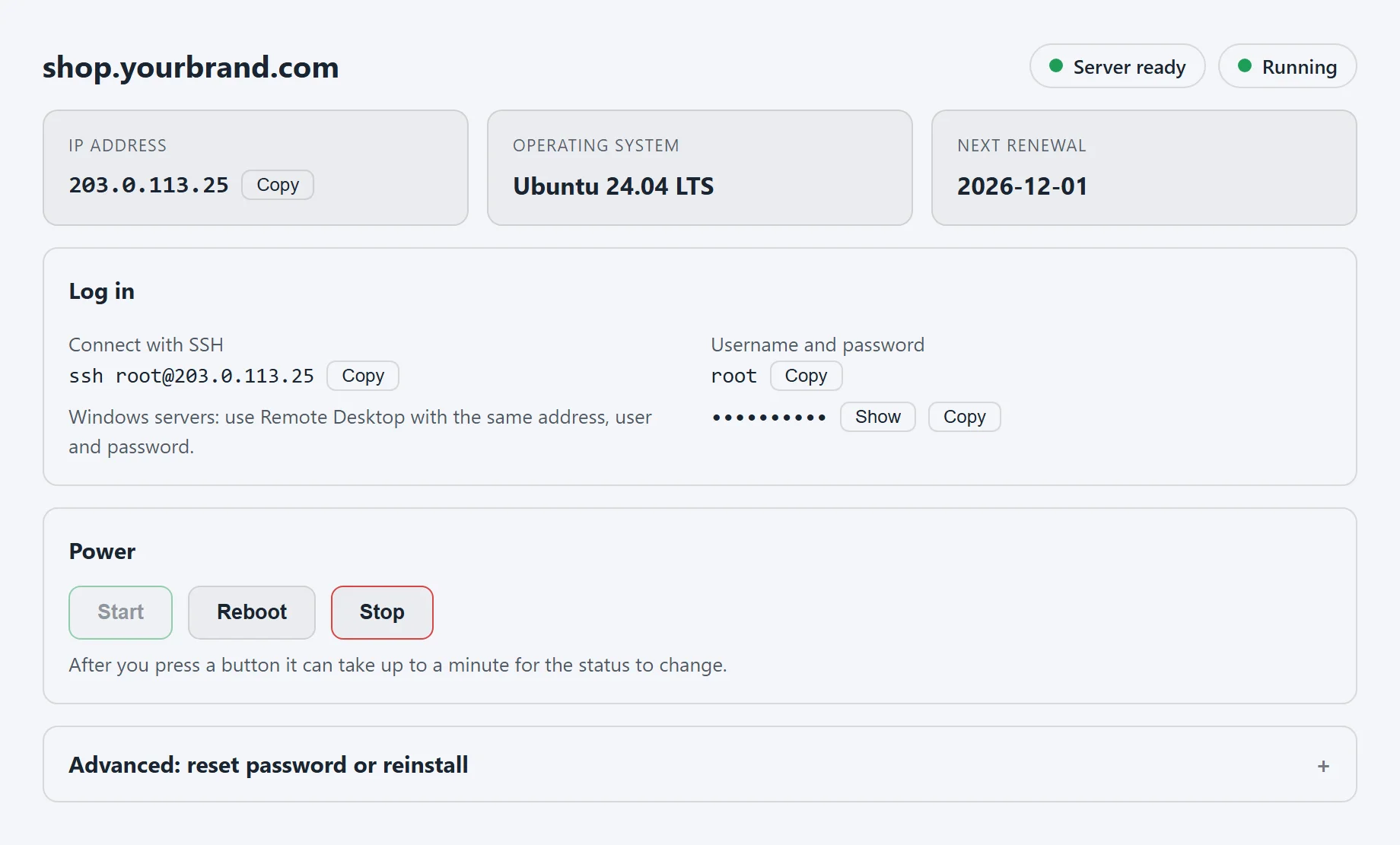
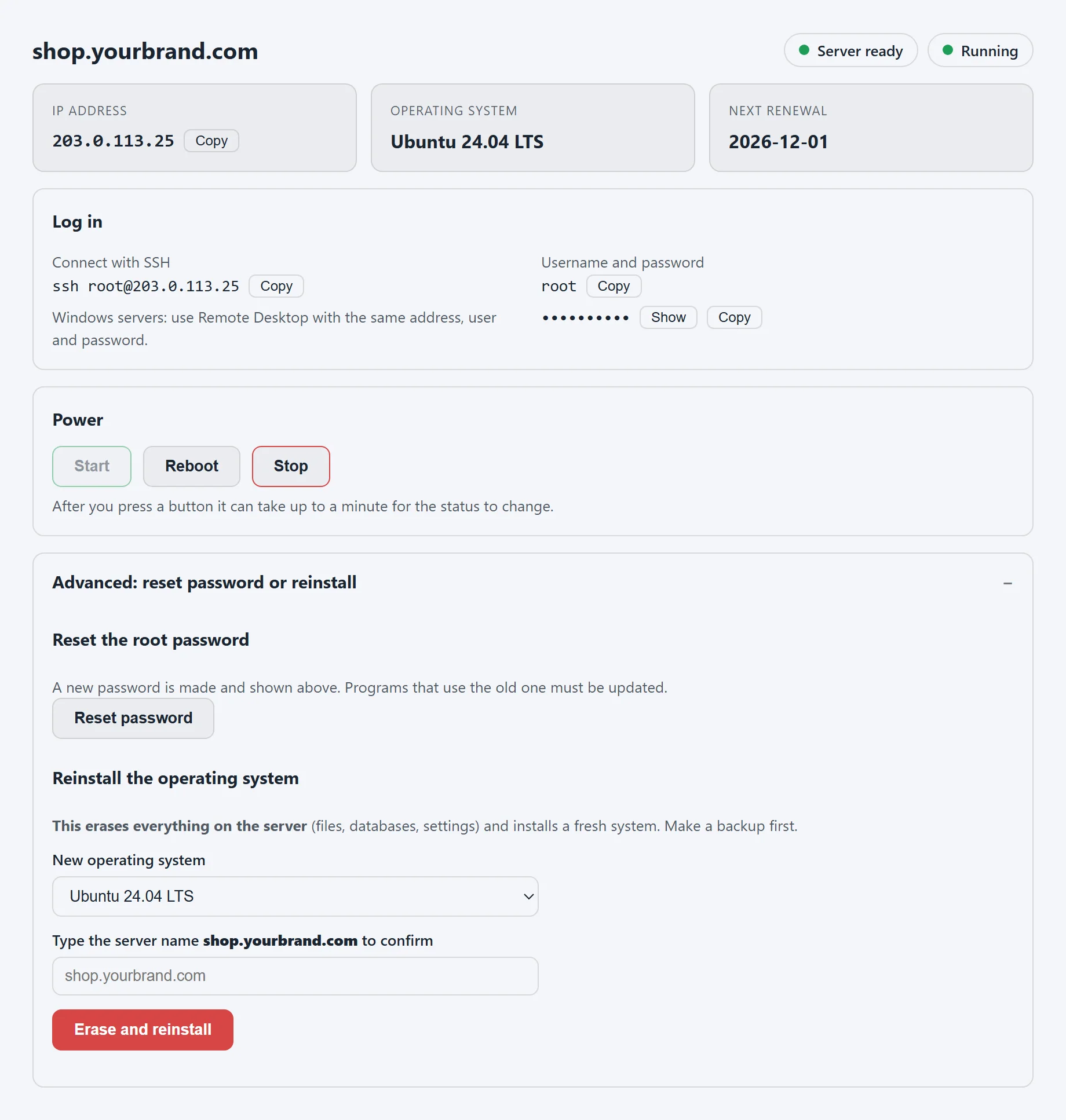
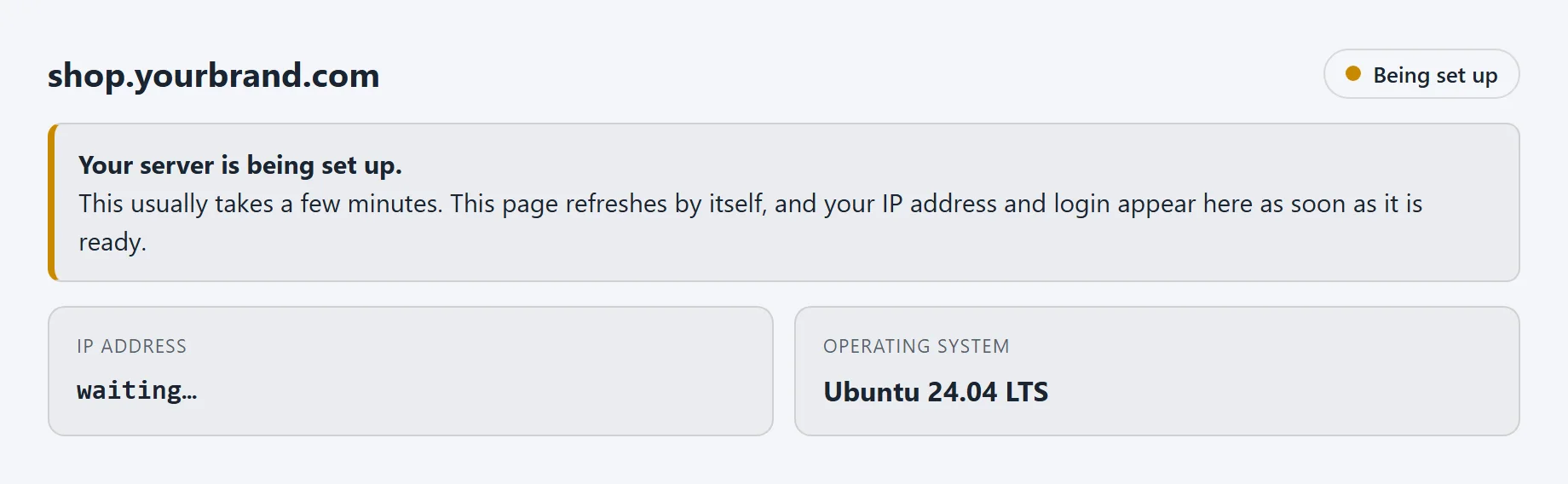
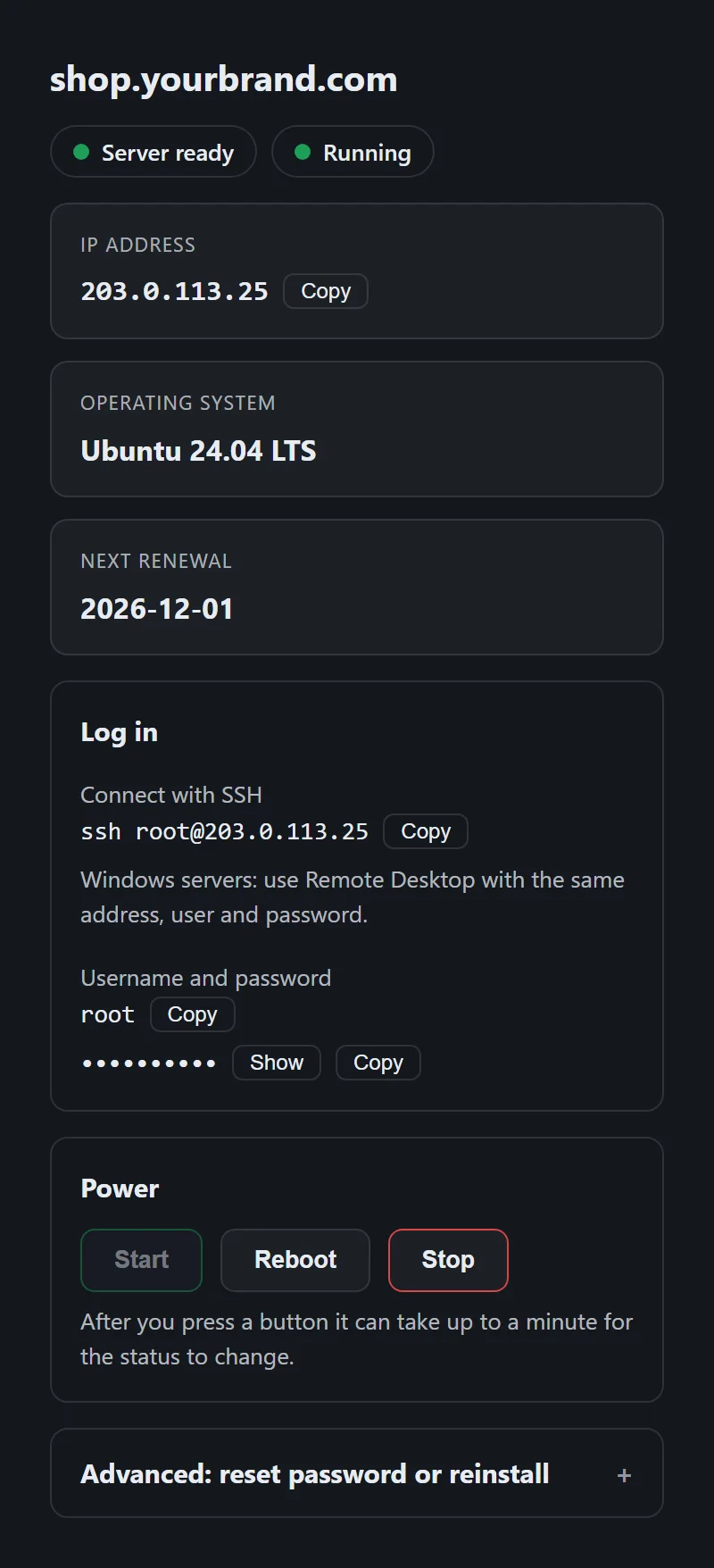
These pictures are the module's own page with sample data. Reset and reinstall can be turned off for each product.
Install in about 10 minutes
You need a WHMCS 8 site and an AtoZNode reseller account with money in the wallet.
- Upload
Unzip the download and copy its
modulesfolder into your WHMCS folder, so thatmodules/servers/atoznode/atoznode.phpexists. - Make an API key
In AtoZNode open Account, Reseller API, press Activate, add money to your wallet and create a key with the scopes Read, Read root logins, Place orders, Manage servers and Terminate servers. Lock it to your WHMCS server's address if that address is fixed.
- Add the server in WHMCS
Under Configuration, System Settings, Products/Services, Servers add a server named AtoZNode with the Hostname atoznode.com, the type AtoZNode Cloud VPS and Dedicated, and your API key in the Password field. Press Test Connection.
- Create a product
Choose the module on the Module Settings tab, pick the plan, operating system and location from the lists, and set your own price. Choose to set it up automatically after the first payment.
- Try one order
Order a small server yourself, check the client area and the admin tab, then terminate it. That takes a few minutes and confirms everything works.
Name:      AtoZNode
Hostname:  atoznode.com
Type:      AtoZNode Cloud VPS and Dedicated
Password:  az_live_xxxxxxxxxxxxxxxxxxxxxxxx   (your API key)
Keep your wallet funded: AtoZNode renews your servers from it. The admin home page in WHMCS shows the balance. The full guide is in the README inside the download.
Safe by design
You are giving a module the key to your AtoZNode wallet, so it should be easy to trust. This is what we did for that.
- Plain PHP source that you can read before you install it. Nothing is encoded or obfuscated, and there is no licence server and no "phone home".
- It only ever talks to atoznode.com, over HTTPS with certificate checks on. A different server Hostname is refused, and redirects are never followed, so your key cannot be sent elsewhere.
- Your API key stays in WHMCS's encrypted server password field. The module never writes your key or any server password to the module log.
- Customer buttons only work as a form post with the WHMCS token, only for the customer's own service, and only for actions you allowed on the product. A link or image cannot trigger them.
- One small table, mod_atoznode, pairs WHMCS services with AtoZNode servers. It holds no keys and no passwords.
- The download is on our own HTTPS site, with its SHA-256 shown here and in a separate file, so you can check that nothing changed on the way.
Use a key that has only the scopes it needs, and lock it to your WHMCS server's address when that address is fixed. If you ever suspect the key leaked, revoke it in AtoZNode under Account, Reseller API, and make a new one. Nothing else needs to change except the Password field of the server entry.
Questions
Is the WHMCS module free?
Yes. The module is free and open source under the MIT licence. You pay only for the servers you order, at your AtoZNode wholesale price, from your AtoZNode wallet. What you charge your own customers is up to you.
Which WHMCS and PHP versions does it support?
WHMCS 8.x with PHP 7.4 or newer (PHP 8.x works too) and the cURL extension, which WHMCS already needs. It has been tested on PHP 7.4 and PHP 8.2.
What happens when a customer pays my WHMCS invoice?
WHMCS runs the module, which orders the server from AtoZNode through the reseller API. The order is paid from your AtoZNode wallet at your wholesale price. The customer sees the IP address and login on their service page as soon as the server is ready, and WHMCS copies them onto the service.
Can customers pick the operating system?
Yes. Add a configurable option called Operating System and use the names from your AtoZNode list as its choices. If the customer does not choose, the default system from the product settings is used.
What can customers do from the client area?
See the status, IP address and login, start, stop and reboot the server, reset the root password and reinstall the operating system. Reset and reinstall can be switched off per product, and a reinstall needs the customer to type the server name first.
What do suspend, unsuspend and terminate do?
Suspend powers the server off, unsuspend powers it on, and terminate deletes the server at AtoZNode. The module sends the exact server name when it deletes, which the API requires as a safety check.
What if my AtoZNode wallet runs out?
A new order is refused with a clear message, nothing is created and nothing is charged, so you can add funds and run Create again. The admin home page in WHMCS shows your wallet balance and warns when it is low.
Does it order twice if something goes wrong in the middle?
No. Every server is created with a reference to the WHMCS service. If the answer to an order is lost, running Create again finds that server and adopts it instead of buying another one.
Can I upgrade or downgrade a plan?
Not through the AtoZNode API, so the module says so instead of doing nothing silently. Create a new server on the new plan and terminate the old one, or ask AtoZNode to resize it.
Do dedicated servers and Windows servers work?
Yes. Dedicated servers are set up by our team, so they show as "being set up" until they are ready, and the details appear on their own. Windows servers show the IP address and password, and customers connect with Remote Desktop.
Is it safe to run on my WHMCS?
It is plain PHP that you can read, with no encoded files and no licence server. It talks only to atoznode.com over HTTPS, keeps your key in WHMCS's encrypted server password field, never writes keys or server passwords to the module log, and customer buttons need the WHMCS form token. See the safety section on this page and check the SHA-256 of your download.
How do I update or remove it?
To update, copy the new modules/servers/atoznode folder over the old one. To remove it, terminate or move your services, delete the products and the server entry that use it, then delete the folder.
Changelog
- 1.0.013 October 2026. First release: automatic ordering after payment, suspend, unsuspend and terminate, a customer page with power, password reset and reinstall, a service tab for staff, and a wallet box on the admin home page.
Start reselling with WHMCS
Activate reseller access, make an API key and download the module. Questions are welcome.